
Measure the plan on screen. Send the quote the same day.
Quote the job without driving to it. Open the PDF, set the scale once, and every area, wall and length you draw becomes a priced line in a quote your client can open by link. No site visit, no CAD file, no scale rule, no spreadsheet in the middle.
Included free during the trial · then NZ$75/user/month · turn it on only for who measures
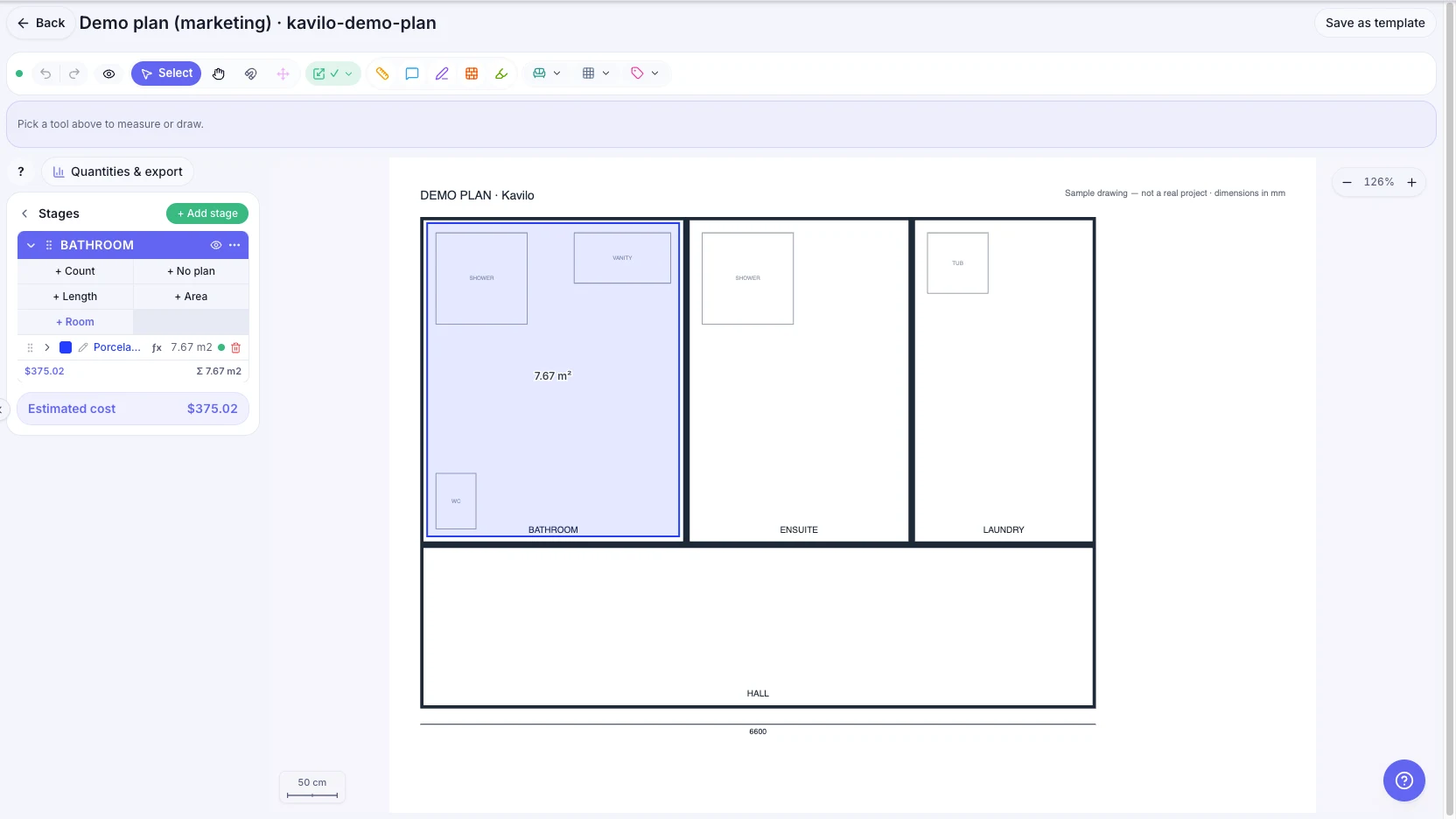
Four steps, and the quote is written
- 1
Open the plan
Drop in the PDF — one page or many. Scanned plans work too; the app reads them as an image and you measure on top.
- 2
Set the scale once
Draw a line over a dimension you can read on the plan and type what it says. Everything you measure after that is in real units.
- 3
Measure what you are pricing
Floor areas, wall runs, perimeters, rooms with their own tile height, openings taken out. Each measurement lands in a stage, so a house with three bathrooms stays three bathrooms.
- 4
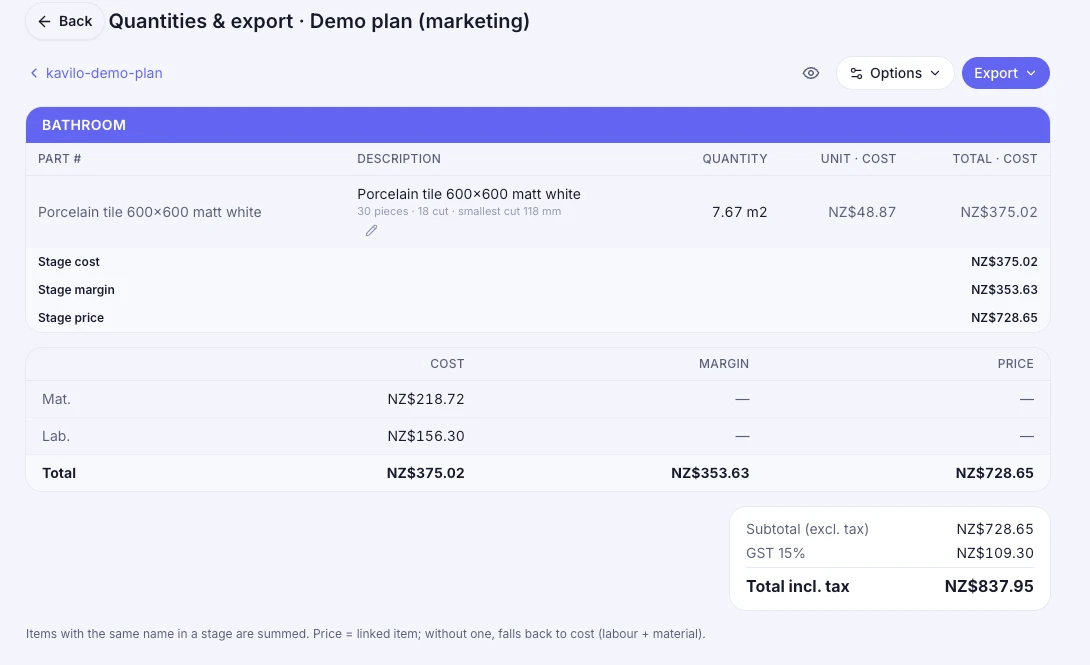
Send the quote
Your prices turn the quantities into money — one line per item. The client opens the quote by link, with no account, and answers.
What you can measure
Built for people who price by the square metre and lose money on the bits that are hard to count.
- Area
- Floors, decks, roofs — any closed shape, with holes subtracted.
- Length
- Skirting, edging, pipe runs, joints — measured along the line.
- Walls
- Measured on the inside face, with doors and windows removed.
- Rooms
- Perimeter and height together, so wall area comes out on its own.
- Tile height
- Per room and per wall — the half-height wall is not the whole wall.
- Count
- Fittings, fixtures, anything you price by the unit.
The whole job, from your desk
A site visit costs half a day and a tank of fuel, and most of the time it only confirms what the plan already says. With the plan on screen you can lay the job out, price it and send it before lunch — and keep the visit for the ones worth visiting.
Quote more jobs
The plan arrives by email at 9 and the quote goes back at 10. No calendar, no travel, no waiting for the client to be home.
Quote from anywhere
It runs in the browser. Measure from the office, from home, or from the ute between jobs — the same file, the same numbers.
Bid on work far away
Distance stops deciding what you can price. If the plan is readable, the job is quotable — another town, another island.
The measurement is not the point. The quote is.
Most takeoff tools stop at a number, and then you retype it somewhere else. In Kavilo the measurement already knows which stage it belongs to and which price applies, so the quote writes itself — and when the job is won, the same job carries the hours, the materials and the invoice. One place, from the plan to the money.
Questions people actually ask
What is on-screen takeoff?
It is measuring a building plan on a screen instead of with a scale rule on paper. You open the PDF, tell the software how long one known line is, and from then on every area, length and wall you draw is a real measurement in metres or feet.
Do I need the original CAD file?
No. A PDF is enough — including a scan or a photo of a printed plan, as long as one dimension on it is legible so you can set the scale.
How does a measurement become a quote?
Each measurement belongs to a stage and carries a price from your own catalogue. When you are done, Kavilo writes one quote line per item, with quantity and total, ready to send to the client.
Can it measure walls and tile height?
Yes. Walls are measured on the inside face, each room can have its own tile height, and openings such as doors and windows are subtracted from the area. Sloped ceilings are handled at the corners, where the height actually changes.
What does it cost?
Takeoff is an add-on to Kavilo: NZ$75 per user per month, on top of NZ$50 per active user. It is included and free during the 14-day trial, and you turn it on per person — only the people who measure need a seat.
Do I still need to visit the site to quote?
Not to measure. If the plan is readable you can lay the whole job out from your desk, price it and send the quote the same day — which means you can quote jobs you would never drive to. Keep the visit for what a plan cannot tell you: access, condition of the substrate, where the water goes.
Is it ready to use?
Kavilo is in beta. The takeoff is used on real jobs every week, and it keeps changing fast — that is the deal: you get it early and cheap, and what you report gets fixed quickly.
Measure your next job tonight
14 days free with everything on, including Takeoff. Cancel any time from inside the app.
Create my account