
Software for tilers, by people who tile
One measurement, the whole job. The tile, the grout and the trim come out together — with waste, cut pieces and the right wall heights. Then the quote, the supplier order, the hours and the invoice, all on the same job.
What a tiler actually needs
One line on the plan, three lines on the quote
Draw a floor and the tile, the grout and the trim come out together — each with its own unit, its own price and its own supplier. You set the recipe once, per tile, and it follows you to every job.
Pieces, not just square metres
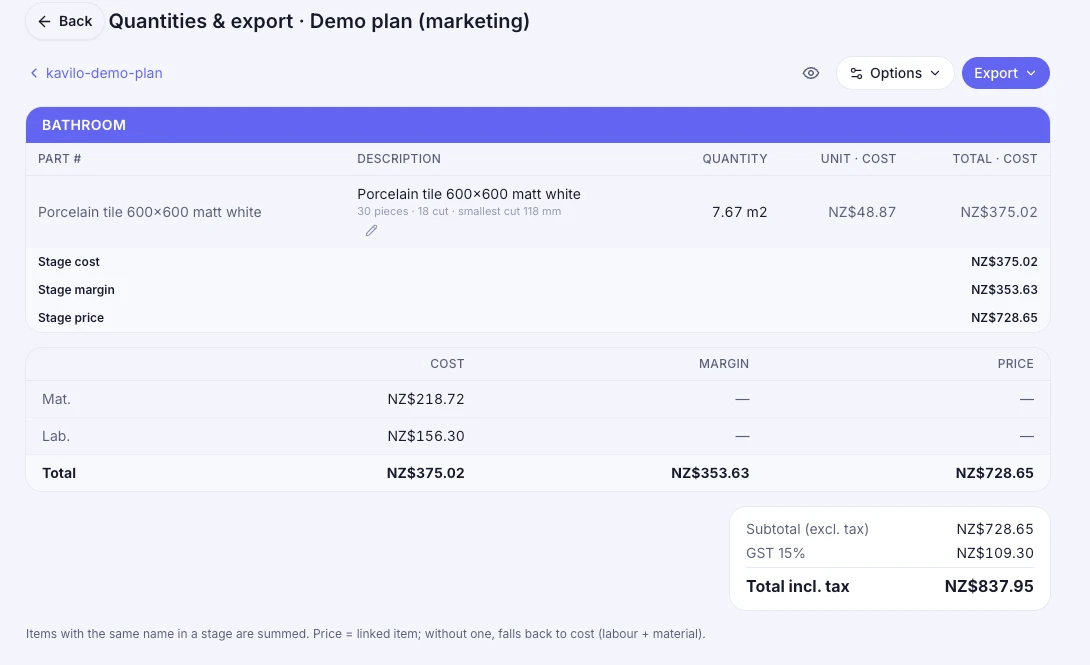
The quote says how many boxes to buy and how many pieces come out cut. Waste is a number you choose, not a guess: 70 pieces, including 10% waste, 15 of them cut.
Tile height per wall, not per house
The shower goes to the ceiling and the vanity wall stops at 1.2 m. Kavilo carries the height on the wall itself, so the wall area comes out right without you doing the arithmetic.
Doors and windows taken out
Openings are removed from the wall they belong to. What you price is what you tile.
Your cost and your price are different numbers
Every material carries what you pay and what you charge, with the margin shown next to it. The purchase order goes out at cost; the quote goes out at price. Nobody confuses the two again.
The job keeps the whole story
Quote, variations, hours from the clock, materials off the van, supplier orders, invoices and retention — all on the same job, so the profit at the end is a fact and not a feeling.
From the plan to the money
- 1
Price it
Measure the plan on screen or type the areas. Your catalogue turns them into money — one line per item, in the client's language.
- 2
Buy it
Turn the accepted quote into purchase orders, split by supplier, at cost. Tax is worked out line by line, so an exempt item stays exempt.
- 3
Do it
The crew clocks in on site from the phone, logs what came off the van and adds photos to the day's notes. It all lands on the job.
- 4
Get paid
Invoice the whole job, a percentage or only the lines you finished. Retention is held back and claimed later, and the numbers match your accounting to the cent.
The spreadsheet is where the money leaks
A quote in one file, the supplier order in another, the hours on a phone and the invoice in the accounting system — and the profit is whatever is left when you finally add it up. Kavilo keeps all of it on the same job, so the margin is a number you can see while the job is still running, not a surprise at the end of it.
Questions people actually ask
Is this only for tilers?
It was built inside a tiling company, so tiling is what it does best — pieces, cuts, waste, wall heights, grout and trim. Everything around it (quotes, hours, purchase orders, invoices, job profit) is the same for any trade, and plenty of it is used that way.
Do I have to measure on the plan to use it?
No. Takeoff is an add-on. Without it you type the quantities and the app does the rest — quote, orders, hours, invoice. With it, the quantities come off the PDF instead.
How does it work out how many tiles to buy?
From the area, the size of the piece and the waste you set. It shows the number of pieces, how many are full and how many come out cut, and rounds up to the box size when the material is sold in boxes.
Can I keep using Xero?
Yes. Kavilo reads and writes quotes and invoices in Xero, and checks every day that both sides show the same number. You can also invoice from Kavilo alone if you would rather not use Xero at all.
What about GST?
Every price says whether the tax is already inside it, added on top, or does not apply — one answer, not a guess. Documents that mix rates add the tax line by line instead of dividing the total, which is where most tools get it wrong.
Does the crew need a computer?
No. Clocking in, notes, photos and materials all work from a phone on site, and the app keeps working when the signal drops.
Price your next bathroom tonight
14 days free with everything on. Cancel any time from inside the app.
Create my account